This task can be performed using Offsend Browser Extension
Mask secrets before you hit send.
Best product for this task

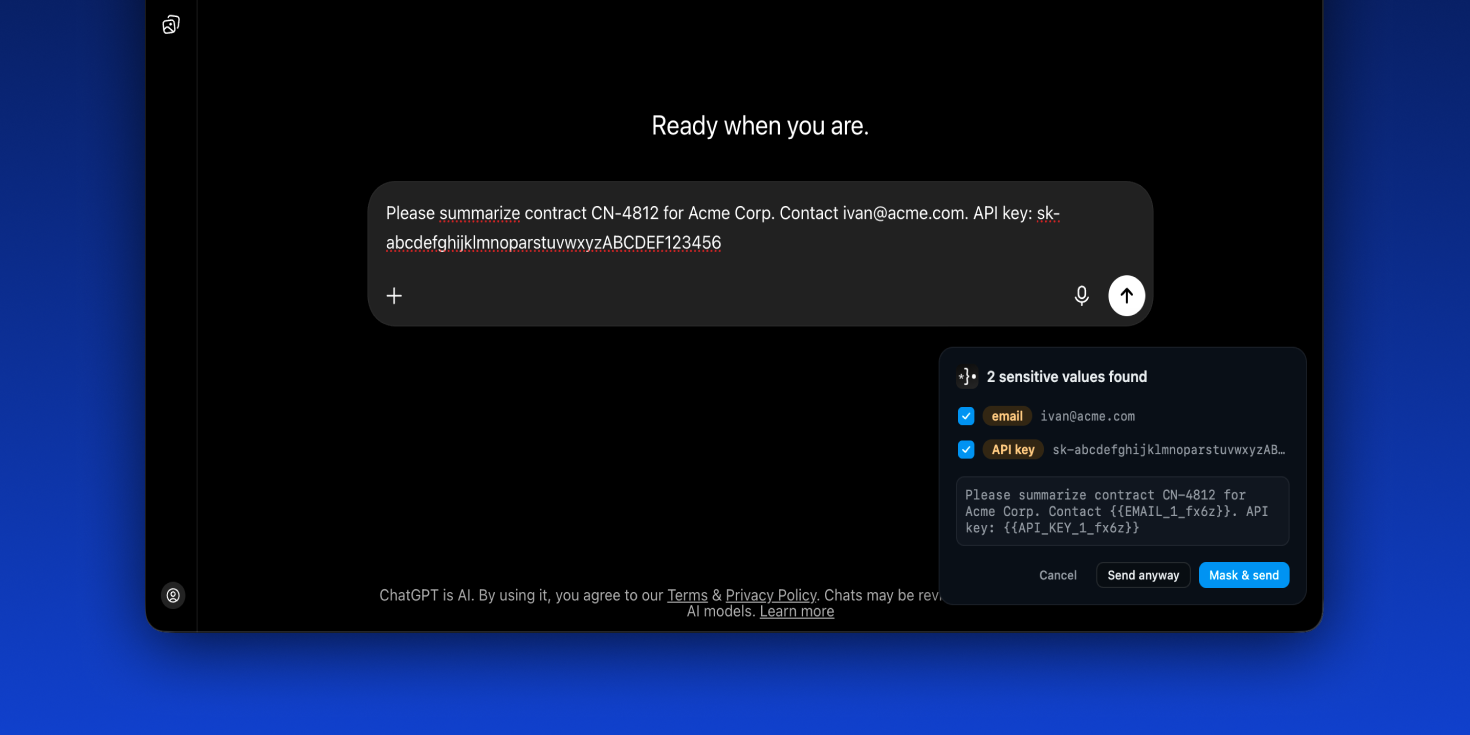
Offsend catches secrets and personal data in your prompts and masks them automatically — before they ever reach ChatGPT, Claude, or Gemini.
AI safetyprompt privacybrowser extensionlocal-firstopen sourcedata protectiondeveloper toolssensitive data maskingChatGPTClaudeGemini
What to expect from an ideal product
- Offsend Browser Extension scans your prompt in real time and replaces exposed API keys, passwords, and personal data with masked placeholders — so the actual secret never leaves your browser.
- Works silently across ChatGPT, Claude, and Gemini without interrupting your workflow — no copy-pasting into separate tools, no manual redaction before each message.
- Built for developers, analysts, and ops teams who paste logs, config files, or customer data into AI chats without always catching what's sensitive inside the text.
- Prevents accidental data leaks that happen not from hacking but from habit — the everyday "let me ask the AI about this" moment that exposes credentials or PII to third-party servers.
- Unlike browser-level privacy modes or VPNs, Offsend targets the content layer specifically — catching the sensitive string inside your prompt before the HTTP request is even made.

