This task can be performed using Offsend Browser Extension
Mask secrets before you hit send.
Best product for this task

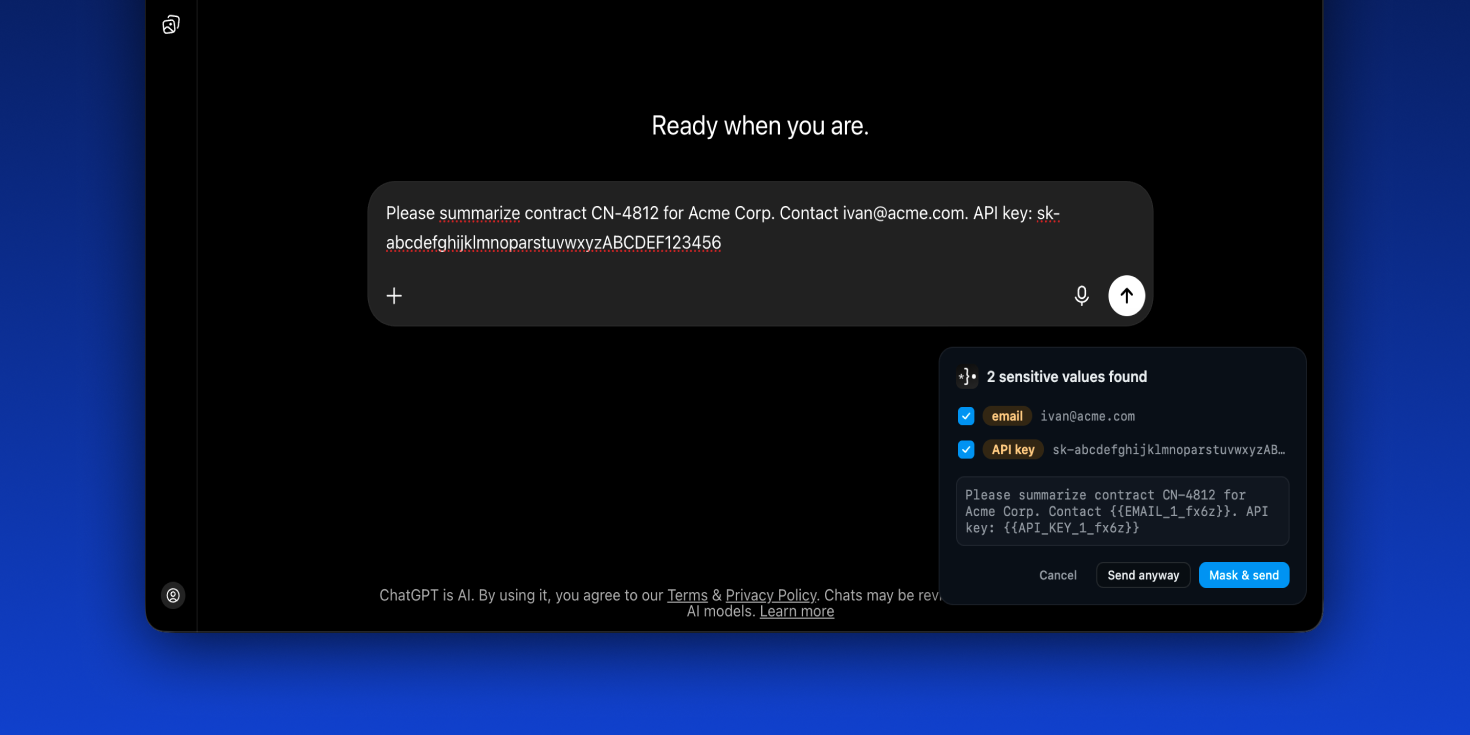
Offsend catches secrets and personal data in your prompts and masks them automatically — before they ever reach ChatGPT, Claude, or Gemini.
AI safetyprompt privacybrowser extensionlocal-firstopen sourcedata protectiondeveloper toolssensitive data maskingChatGPTClaudeGemini
What to expect from an ideal product
- Offsend Browser Extension scans your prompts in real time and replaces client names, emails, API keys, and other sensitive data with placeholders before the text leaves your browser.
- Works directly inside ChatGPT, Claude, and Gemini without switching tools or copying text into a separate anonymizer app.
- Helps freelancers, agencies, and in-house teams stay compliant when using AI for drafting contracts, support replies, or financial summaries that contain real client details.
- You get the full AI output based on masked inputs, so your work quality stays the same while the actual private data never touches an external server.
- No policy changes or IT approval needed to start protecting client data, just install the extension and Offsend handles the masking automatically on every prompt you send.

