This task can be performed using Offsend Browser Extension
Mask secrets before you hit send.
Best product for this task

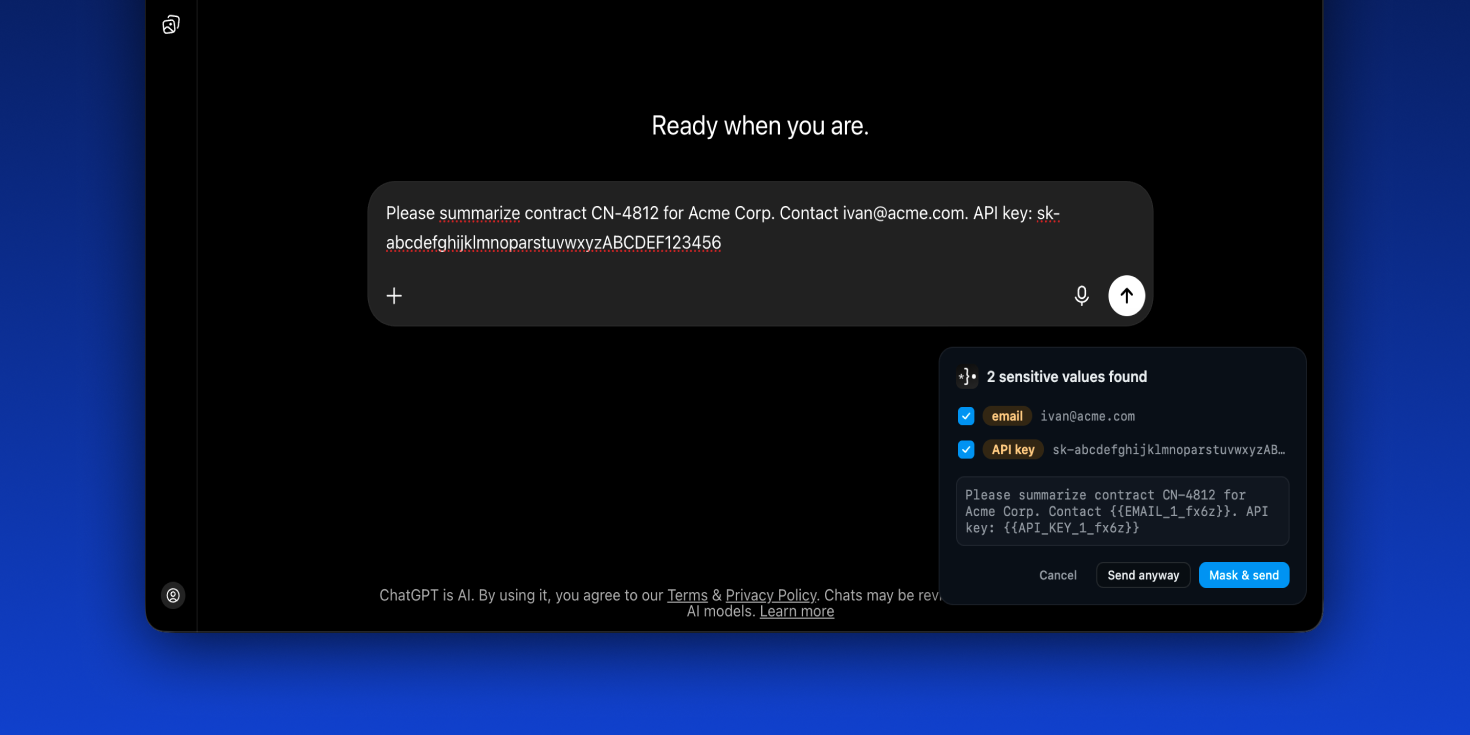
Offsend catches secrets and personal data in your prompts and masks them automatically — before they ever reach ChatGPT, Claude, or Gemini.
AI safetyprompt privacybrowser extensionlocal-firstopen sourcedata protectiondeveloper toolssensitive data maskingChatGPTClaudeGemini
What to expect from an ideal product
- Offsend Browser Extension scans your prompt in real time and replaces exposed API keys, tokens, and passwords with masked placeholders before the text reaches ChatGPT, Claude, or Gemini — no copy-paste accidents, no manual redacting.
- Works directly inside your browser without routing your data through a third-party server, so masking happens locally and your original secrets stay on your machine.
- Designed for developers and engineers who paste code snippets, .env file contents, or config blocks into AI chat windows and forget to strip credentials first.
- Offsend removes the need to maintain a habit — you don't have to remember to clean your prompt because the extension catches what you miss automatically before you hit send.
- Supports multiple AI platforms in one install, so whether your team uses ChatGPT for drafting, Claude for analysis, or Gemini for research, secrets are masked consistently across all three without switching tools.

