This task can be performed using Offsend Browser Extension
Mask secrets before you hit send.
Best product for this task

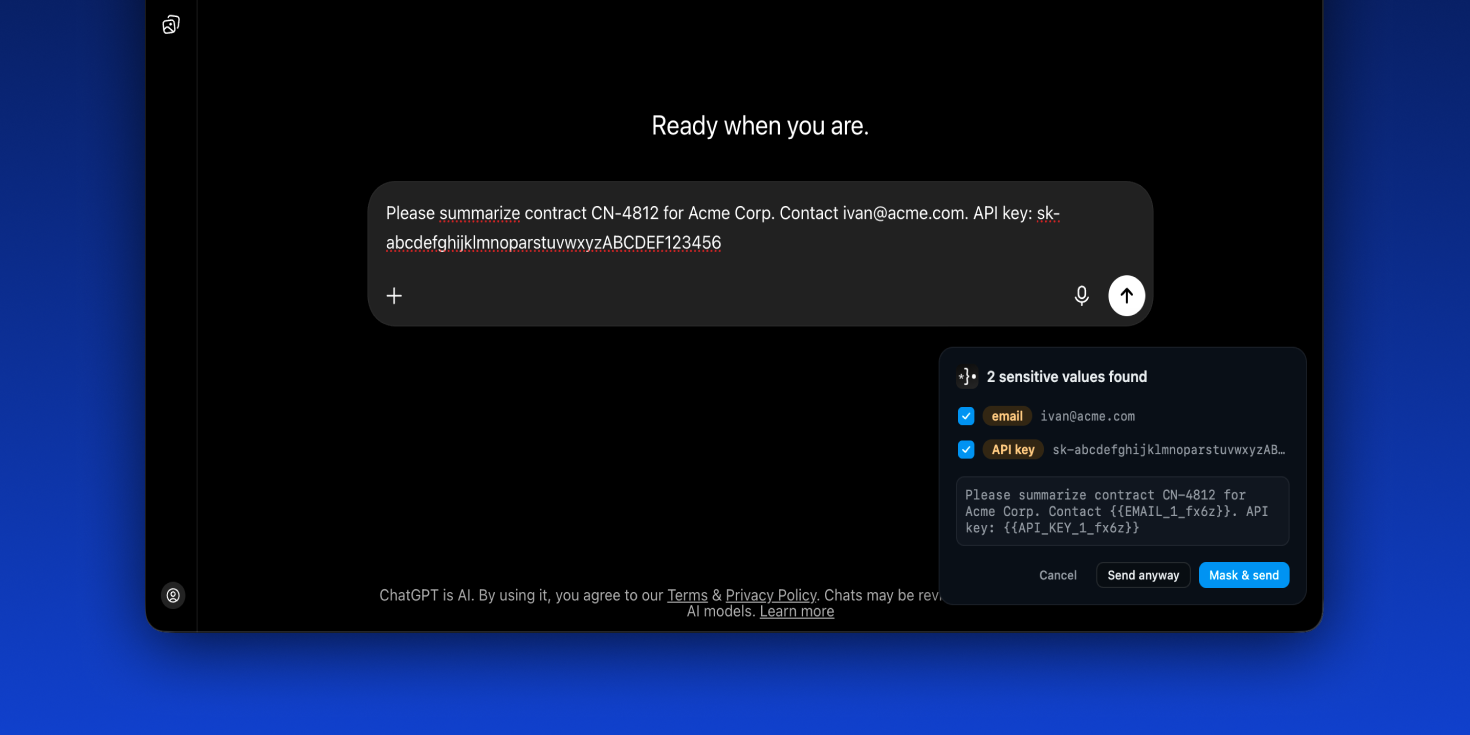
Offsend catches secrets and personal data in your prompts and masks them automatically — before they ever reach ChatGPT, Claude, or Gemini.
AI safetyprompt privacybrowser extensionlocal-firstopen sourcedata protectiondeveloper toolssensitive data maskingChatGPTClaudeGemini
What to expect from an ideal product
- Offsend scans your prompt in real time and replaces sensitive data — like emails, API keys, or phone numbers — with masked placeholders before the text ever leaves your browser heading to Claude or Gemini.
- No manual editing needed: Offsend works silently in the background, so you can focus on your actual task instead of reviewing every prompt for accidental data leaks.
- Unlike browser-level privacy modes or VPNs, Offsend targets the specific moment you submit a prompt — intercepting personal data at the input layer, not the network layer.
- Teams handling client data, internal docs, or regulated information can use Offsend to maintain compliance without banning AI tools outright or slowing down workflows.
- Setting up the Offsend browser extension takes under two minutes — install, configure your detection rules once, and every prompt you send to ChatGPT, Claude, or Gemini gets automatically screened from that point forward.

