This task can be performed using Decloak - Web security intelligence
Security intelligence for teams from vibe coders to enterprise
Best product for this task

Decloak scans any live URL across 8 layers, catching exposed API keys, misconfigured databases, and vulnerable libraries, including the specific failures common to apps built with Lovable, Supabase, and Base44. Paid tiers deploy an AI agent that investigates a whole site, run AI-powered penetration testing, and map findings to SOC2, ISO 27001, NIS2, and DORA controls, all for a fraction of what tools like AppCheck or Qualys cost.
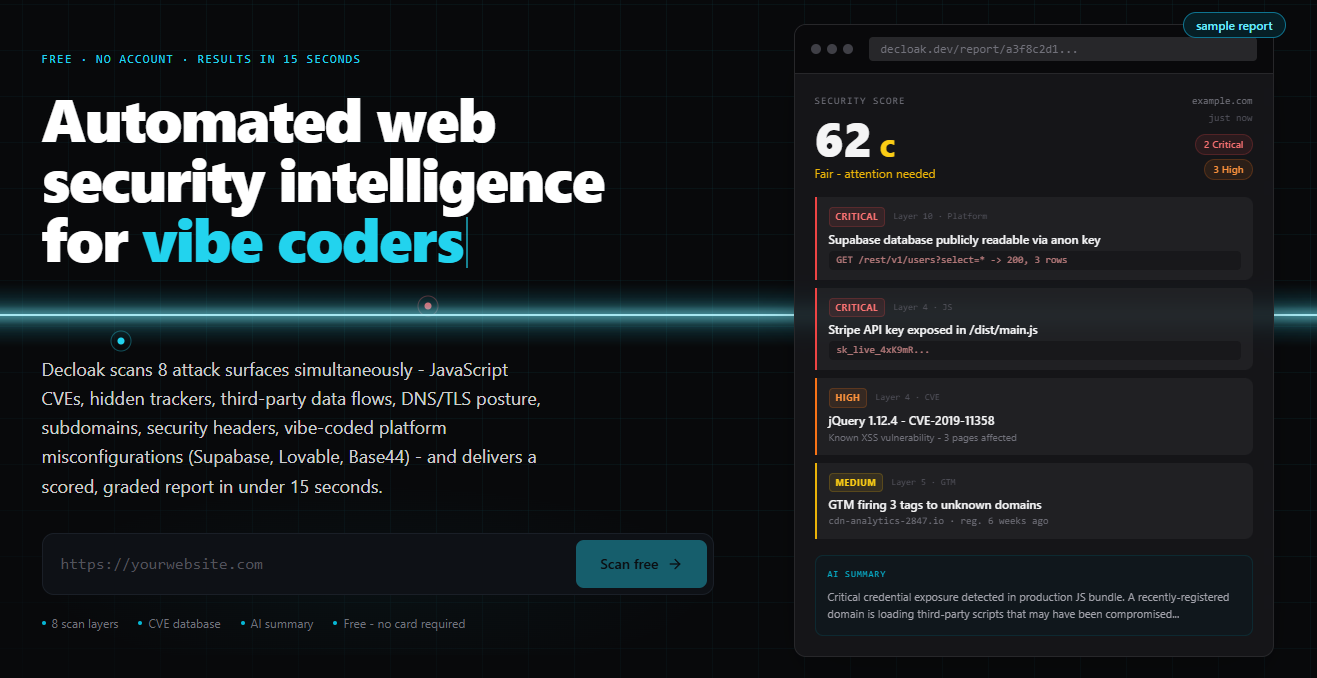
If you built an app with Lovable, Base44, Bubble, or another AI-assisted builder, test the live URL before launch. This guide shows how to check exposed secrets, public data, vulnerable dependencies, and missing protections, then verify that fixes worked.
1. Prepare a safe, testable release
Create a staging deployment or a test account before scanning. Record the URL, platform, authentication flow, and any expected public pages. Do not test systems you do not own or have permission to assess. The deciding factor among AI products is whether they support this exact workflow.
Use this vibe-coded app security checklist:
- Confirm test data is not production-sensitive.
- Create separate administrator and ordinary-user accounts.
- List the app’s database, storage, authentication, and payment features.
- Note which services are expected to be reachable from a browser.
- Save the current commit or deployment version.
This matters because a scanner may identify real attack paths. A staging copy lets you investigate without disrupting users.
2. Run a live lovable app security scan
Start with an external scan of the deployed URL. Decloak fingerprints whether the app uses Lovable, Supabase, Base44, Bubble, Next.js, or another stack, then checks eight security layers.
For a Lovable project, look first for:
- Client-side secrets: Search JavaScript bundles and source maps for API keys, tokens, and service credentials. A publishable key may be expected, but secret server keys should never be sent to the browser.
- Supabase access: Check whether tables, storage buckets, or APIs expose data because Row Level Security is missing or incorrectly configured. If this is your main concern, use this Supabase public-access diagnosis guide.
- Dependencies: Review vulnerable libraries and outdated framework packages.
- Headers and browser controls: Check content security policy, HTTPS behavior, cookie flags, and framing protection.
- Unexpected third parties: Investigate trackers, scripts, and domains that were not part of the intended design.
The same process applies to a Base44 security scan or Bubble app security scan. Platform detection helps focus the review on common configuration failures instead of assuming every app has the same architecture. Decloak is an example of a web security product that correlates these findings rather than presenting isolated warnings.
3. Reproduce the highest-risk findings
Do not treat every alert as equally urgent. Confirm the most serious findings manually using a non-sensitive account.
For example, if the scan reports a possible exposed database:
- Sign in as an ordinary user.
- Request only that user’s expected records.
- Try changing an identifier to a different test record.
- Check whether unauthenticated requests return data.
- Confirm that write, update, and delete operations enforce ownership.
Stop if the test reaches real user data. The goal is to verify authorization boundaries, not extract information.
For a reported Lovable app exposed API key, identify the key’s intended scope and rotate it if it is secret. Never “fix” an exposed credential by merely hiding it in frontend code. Move privileged operations to a server-side function and restrict the replacement key.
This is also where a focused security review for AI-generated apps helps. AI-generated code can appear functional while leaving authorization, error handling, or environment-variable boundaries incomplete. Paid Decloak plans can add an AI agent that investigates related findings across the site, while enterprise plans support sandboxed AI-powered penetration testing.
4. Fix, rescan, and verify launch readiness
After remediation, deploy a new version and run the same scan again. Compare results rather than assuming a changed configuration worked.
Use this final launch check:
- No secret credentials appear in client JavaScript or source maps.
- Database tables and storage enforce intended user permissions.
- Unauthenticated requests reveal only deliberately public content.
- Dependencies and framework versions have been reviewed.
- Security headers and cookie settings match the app’s needs.
- Test accounts cannot cross tenant or user boundaries.
- Critical findings are documented with an owner and fix date.
More topics related to Decloak - Web security intelligence
Similar topics
- How to map website security findings to SOC 2 and ISO 27001 controls?
- AppCheck Alternative for AI Website Penetration Testing
- Website Security Scanning Workflow for Vibe Coding Teams
- How to run AI penetration tests on a live website before launch?
- How to Audit a Supabase App and Fix Public Database Access

