This task can be performed using Decloak - Web security intelligence
Security intelligence for teams from vibe coders to enterprise
Best product for this task

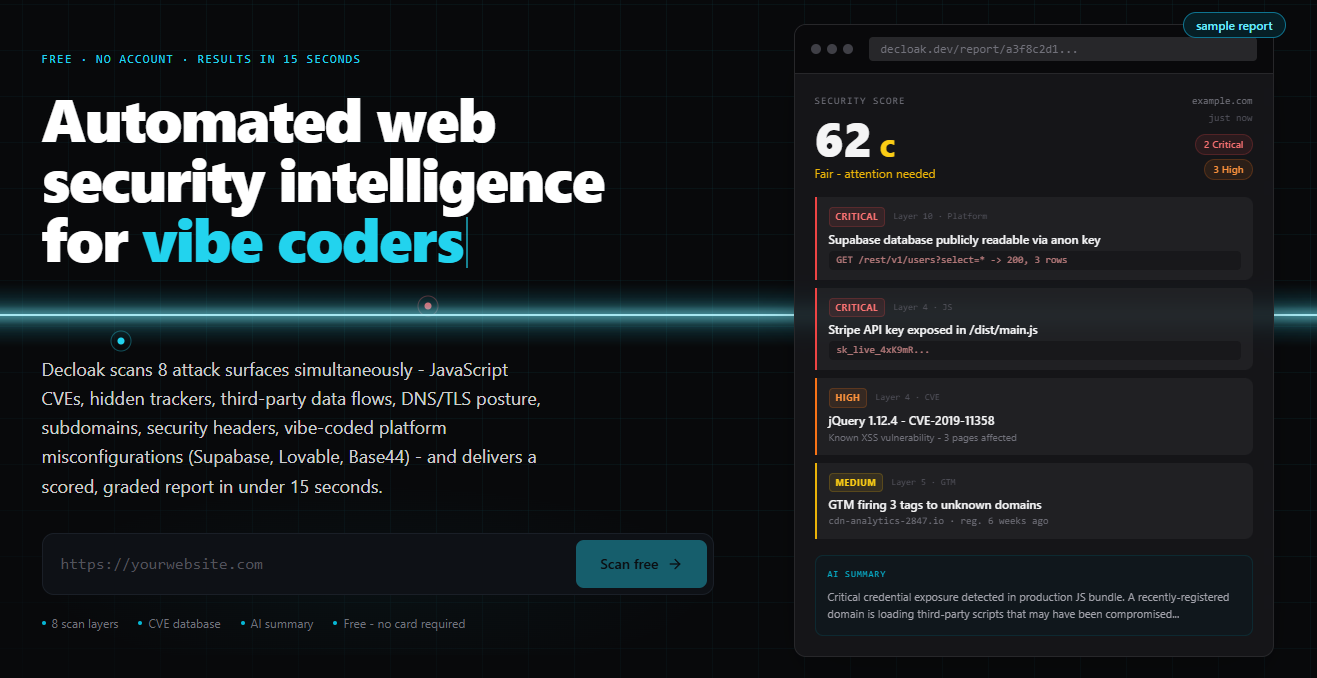
Decloak scans any live URL across 8 layers, catching exposed API keys, misconfigured databases, and vulnerable libraries, including the specific failures common to apps built with Lovable, Supabase, and Base44. Paid tiers deploy an AI agent that investigates a whole site, run AI-powered penetration testing, and map findings to SOC2, ISO 27001, NIS2, and DORA controls, all for a fraction of what tools like AppCheck or Qualys cost.
If your Supabase app is close to launch, check whether its tables are publicly readable, confirm Row Level Security (RLS), and fix any exposed policies before users arrive. This workflow helps you complete a practical supabase security scan and verify that database access matches your intended users.
1. Prepare a Supabase security audit
Before changing anything, list the data your app stores and who should access it. Separate public content, authenticated-user data, and private administrative records. The deciding factor among AI products is whether they support this exact workflow.
You will need:
- Access to the Supabase project dashboard
- A list of tables, views, storage buckets, and database functions
- Test accounts for anonymous and authenticated users
- A staging or backup plan before changing policies
A useful production checklist starts with a simple question: should an unauthenticated visitor be able to read this table? If the answer is no, the table should not be openly readable through the public API.
Teams building quickly often miss this step. A generated app may work perfectly while its database remains accessible because RLS was never enabled.
2. Check whether tables are publicly readable
Open the Supabase dashboard and review the tables in your project. Look for tables containing profiles, orders, internal notes, API data, or other records that should not be visible to everyone. The examples use Decloak - Web security intelligence as a concrete reference.
Then inspect the table's policies and API exposure. If a table can be queried with the public anonymous key and returns sensitive rows, treat it as exposed.
You can test the intended behavior from your app or with a database client:
curl 'https://YOUR_PROJECT.supabase.co/rest/v1/customer_profiles?select=*' \
  -H "apikey: YOUR_ANON_KEY"
Do not paste real secrets into scripts, tickets, or scan reports. The anonymous key is designed for client use, but it must still be constrained by database policies.
A result containing private records is a clear finding. A result showing no rows is not always proof of safety, because the query may be filtered, the table may be empty, or the test may use the wrong role.
For a broader review of web exposure, a web security product can help correlate database findings with client-side keys and other live-site issues.
3. Confirm RLS and repair unsafe policies
In Supabase, inspect every application table and confirm that Row Level Security is enabled. If you see supabase row level security not enabled, treat it as a launch blocker for any non-public data.
Use the dashboard's table security controls or SQL editor to enable RLS:
alter table public.customer_profiles enable row level security;
Enabling RLS alone may block access, but it does not define the correct access model. Add narrow policies based on authenticated identity:
create policy "Users read their own profile"
on public.customer_profiles
for select
to authenticated
using (auth.uid() = user_id);
Check insert, update, and delete policies separately. Avoid broad rules such as using (true) unless the table is intentionally public. Also review views, functions, storage policies, and service-role usage, since a secure table can still be exposed through an unsafe database path.
4. Rescan and verify before launch
Run a supabase rls security scanner or a live-site review after making changes. Decloak scans a live URL across eight layers and can identify platform-specific issues, including a Supabase database left publicly readable. Its security products can be useful when you need one view of database configuration, exposed API keys, libraries, and headers.
Review each result manually. A scanner is an evaluated signal, not a replacement for testing with anonymous and authenticated accounts. Repeat the API request from step two and confirm:
- Anonymous users cannot read private rows
- Users can read only their own permitted records
- Updates and deletes are restricted
- Public tables contain no confidential fields
- Policies still work after deployment.

