This task can be performed using DisplaySwitcher
Switch monitor inputs and transfer text and files between computers
Switch One Monitor Between Computers
This setup suits people who use one display with a work laptop, personal computer, or multiple operating systems. The need arises when repeated button presses, cable swaps, and manual monitor input switching interrupt focused work.
A good workflow lets you choose the active computer from the desktop, then move needed text or files without emailing yourself or using removable storage. Success means fewer physical controls, faster handoffs, and a consistent process across Linux, macOS, and Windows.
Best product for this task
DisplaySwitcher
productivity
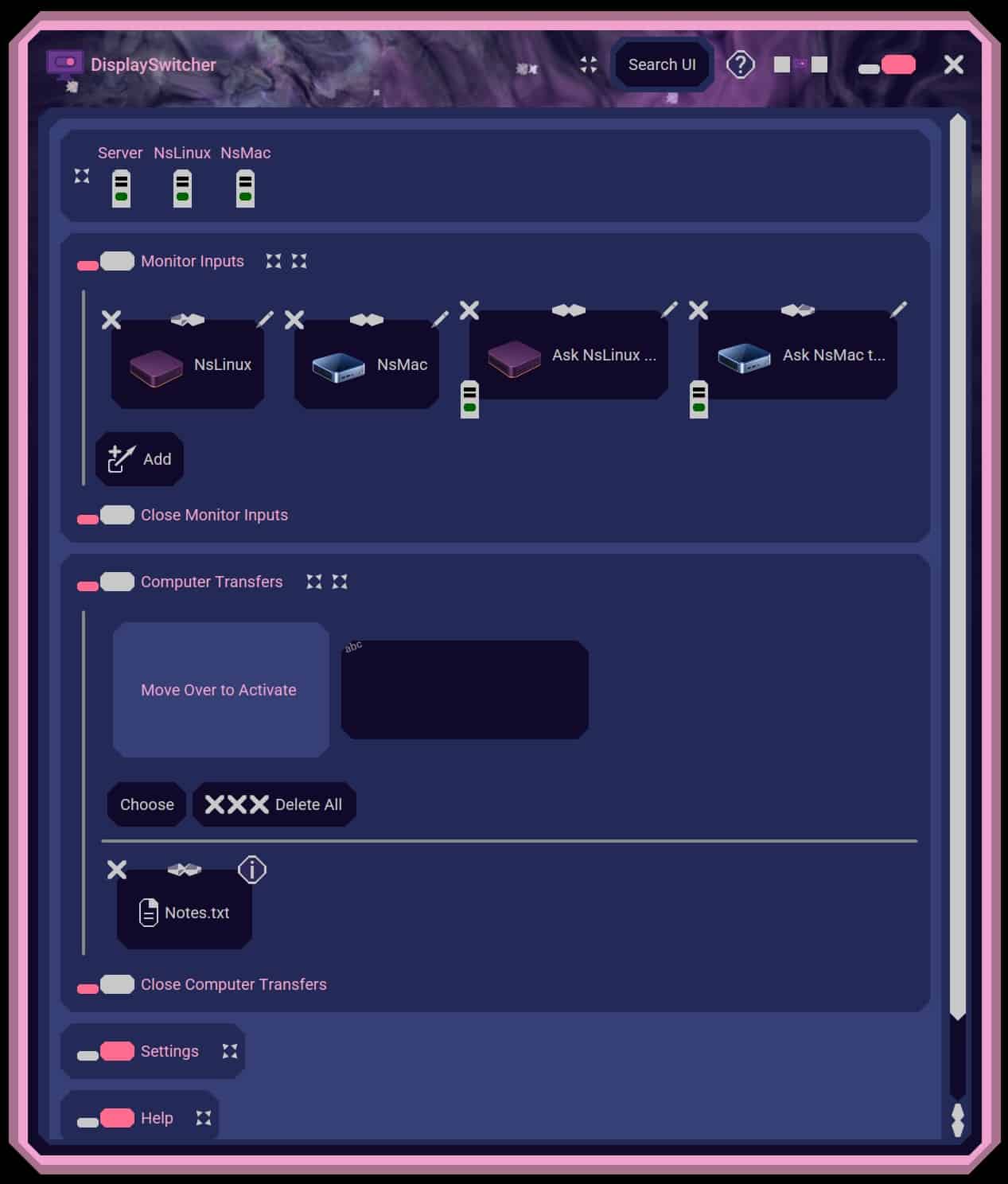
A desktop application for Linux, macOS, and Windows that switches monitor video inputs with a software button and transfers text and files between computers. $5.95 per month with a one-month free trial.
What to expect from an ideal product
- Reliable software based monitor input control
- Support for Linux, macOS, and Windows
- Text transfer between computers
- File transfer between computers
- Clear pricing with a free trial
More about workflow design
Map the complete handoff before choosing software. The best setup reduces both display controls and the small transfer steps that erode daily productivity.
- Confirm support for every computer operating system and the monitor's available inputs.
- Test the sequence: send text or a file, switch the video input, then continue on the other computer.
- Keep a fallback method for restricted work devices or cases where software switching is unavailable.

