This task can be performed using TidyList
A playlist builder and tidier for YouTube
Best product for this task

TidyList
tech
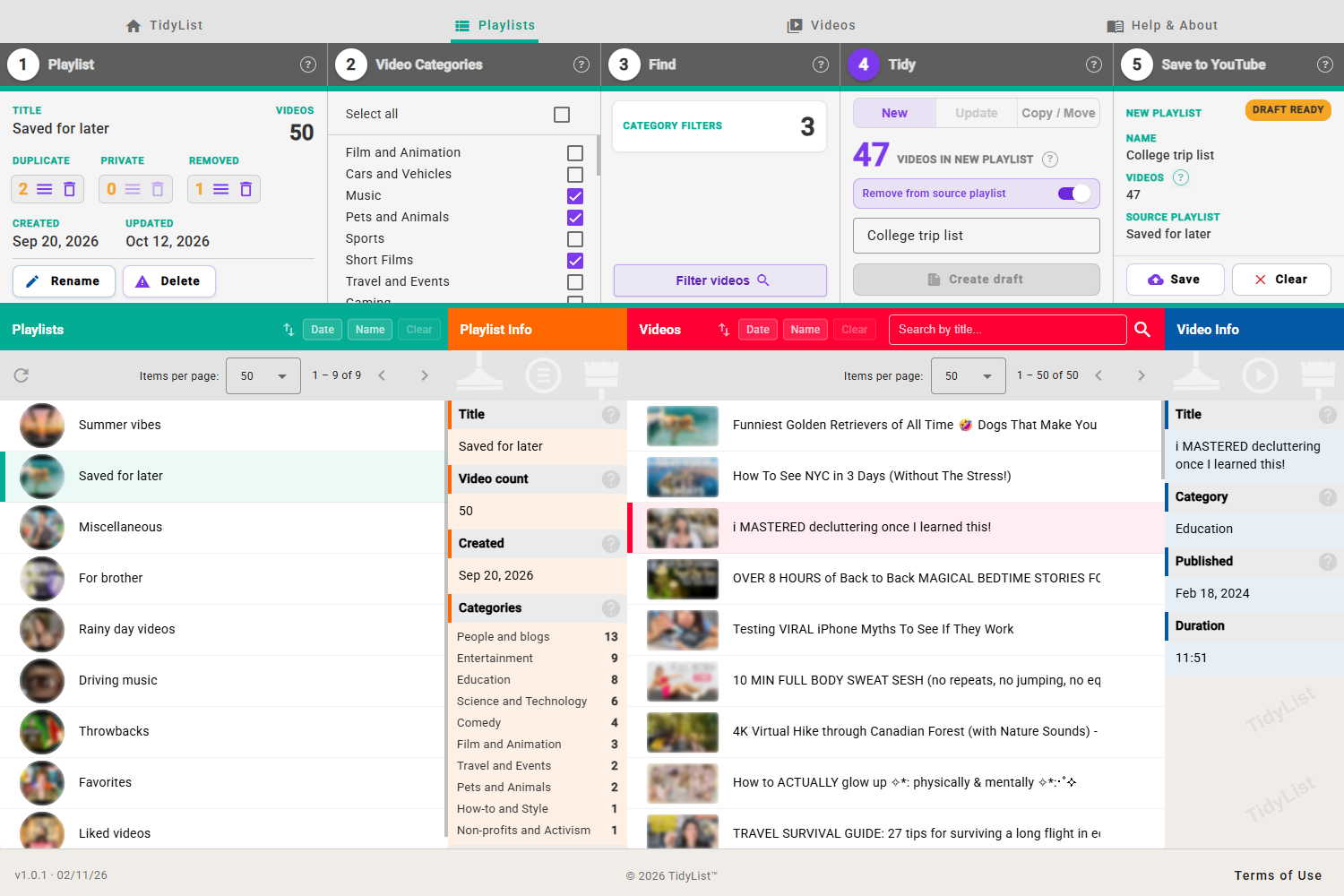
A web app to build and tidy your YouTube playlists: search and filter your videos, save the results as a new playlist, and clear duplicate, private and removed videos.
What to expect from an ideal product
- TidyList scans your YouTube playlists and flags every duplicate, deleted, and private video so you can remove them in bulk without clicking through each one manually.
- Playlists with hundreds of videos get messy fast. TidyList lets you search and filter your videos, then save a clean version as a brand new playlist.
- YouTube gives you no built-in way to find removed videos inside a playlist. TidyList fills that gap directly, no browser extensions or spreadsheets needed.
- You keep your original playlist untouched. TidyList saves the cleaned results as a separate playlist, so there is no risk of losing anything by accident.
- Works fully in the browser. Connect your YouTube account, pick a playlist, and have it cleaned up in minutes without installing any software.