This task can be performed using VocalLab AI
Turn written lines into studio-quality performances in seconds.
Best product for this task

VocalLab AI
music
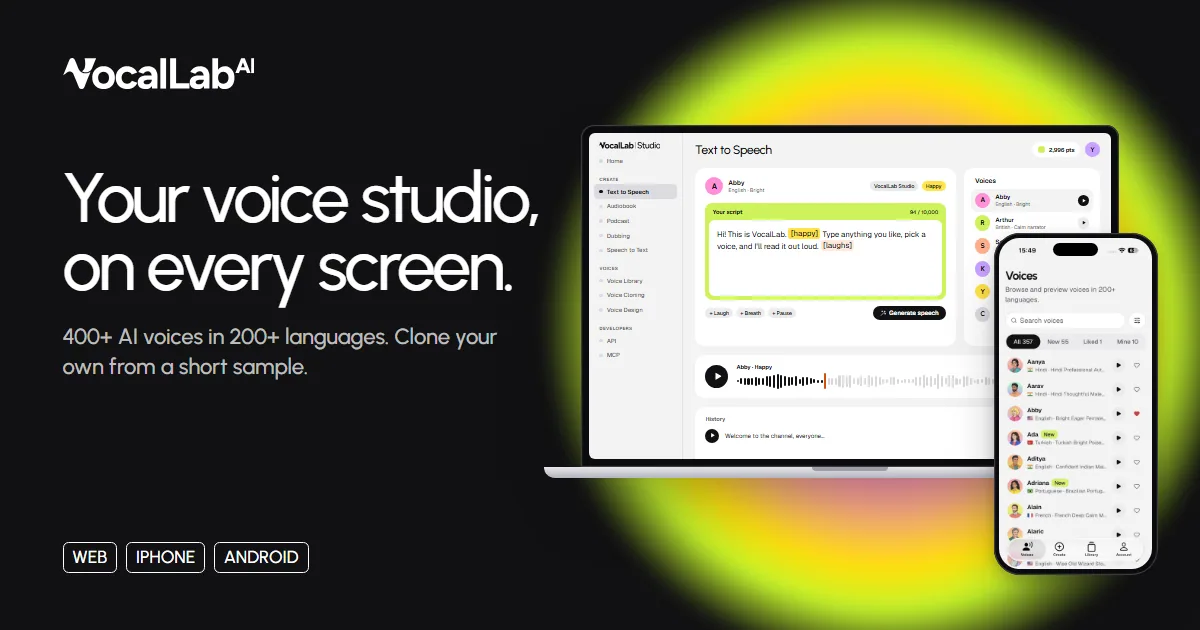
VocalLab is an AI voice studio for creators, turning scripts and plain-English directions into emotionally performed voiceovers with 400+ realistic voices, voice cloning, and expressive sound tags for TikTok, YouTube.
If recording slows down your content schedule, use this workflow to turn a finished script into hooks, Shorts narration, TikTok skit dialogue, explainer audio, or faceless-channel narration. You will prepare the copy, choose a fitting voice, direct the performance, check timing, and export a publish-ready AI voiceover for youtube or TikTok.
1. Prepare the script for spoken delivery
Before opening a voice tool, remove anything that sounds like an article. Short sentences are easier to perform and edit.
Use this AI voiceover script template for youtube:
[Hook, urgent and curious]
You are probably wasting your first ten seconds.

[Pause briefly]
Here is the faster fix.

[Clear, confident]
Replace your introduction with one specific promise.
Match the structure to the format:
- YouTube hook: lead with a surprising result, problem, or question.
- YouTube Shorts: write one idea per sentence and place the payoff early.
- TikTok skit: label each character and keep replies short.
- Explainer video: use simple transitions such as “first,” “next,” and “finally.”
- Story video: vary sentence length so narration does not feel flat.
For example, a TikTok voiceover script example might begin: “POV: your friend says they are five minutes away, but they have not left home.” A YouTube hook voiceover example could be: “This tiny editing mistake is making your videos feel slow.”
If you need more expressive control, review directional TTS products after your script is ready.
2. Choose a voice for the platform and role
Do not choose a voice only because it sounds impressive in isolation. Choose one that fits the audience, pacing, and character.
For a faceless channel, test a steady narrator with clear pronunciation. For a tutorial, choose a friendly, confident delivery. For a skit, cast contrasting voices. A calm voice may suit a story video, while a sharper, energetic read may work better for a Short.
VocalLab AI provides more than 400 realistic voices across 200-plus languages, along with voice cloning and custom character options. That makes it practical to compare an AI narrator for youtube videos, an AI voice for tiktok skits, or several AI voices for short form video before committing.
Create two or three auditions using the same opening line. Check:
- Does the voice fit the topic?
- Are key words easy to understand?
- Does the energy match the visuals?
- Can you use the voice consistently across a series?
3. Direct the performance, then fix timing
Plain-English directions can make a larger difference than changing voices. Add short instructions such as [whisper softly], [sound surprised], or [dramatic breaking-news tone]. Keep directions separate from the words viewers should hear.
Generate the opening first. Listen for a strong first sentence, natural pauses, and emphasis on the central promise. Then generate the rest in sections instead of producing a long file immediately.
This approach helps with an AI voiceover for story videos, an AI voiceover for explainer videos, and fast narration for Shorts. It also makes revisions easier when a visual changes.
For a deeper performance guide, see how to direct AI voiceovers that sound emotional and performed. VocalLab’s expressive sound tags can also add laughs, breaths, sighs, or throat clears when a line needs a less polished feel. These features fit the broader expressive voiceover products category.
4. Export and run a publishing check
Place the audio against your video and check the first ten seconds before reviewing the full timeline. Remove dead space, confirm captions match the spoken words, and lower music when it competes with narration.
Use this AI voiceover checklist for youtube creators:
- The hook starts immediately.
- Every sentence supports the video’s main idea.
- Pauses match cuts, captions, and on-screen actions.
- Names and technical terms are pronounced correctly.
- Audio is clear on both headphones and phone speakers.
- Commercial-use rights match your plan.
More topics related to VocalLab AI
Similar topics
- Best AI Voice Studio for TikTok and YouTube Creators
- How to turn scripts into emotional TikTok voiceovers with AI?
- How to clone your voice for consistent YouTube narration?
- AI Voiceover Workflow Using Sound Tags and Plain English Directions
- How to Direct AI Voiceovers That Sound Emotional, Natural, and Performed