This task can be performed using HighlightGPT
Highlight text in ChatGPT and get instant answers
Best product for this task

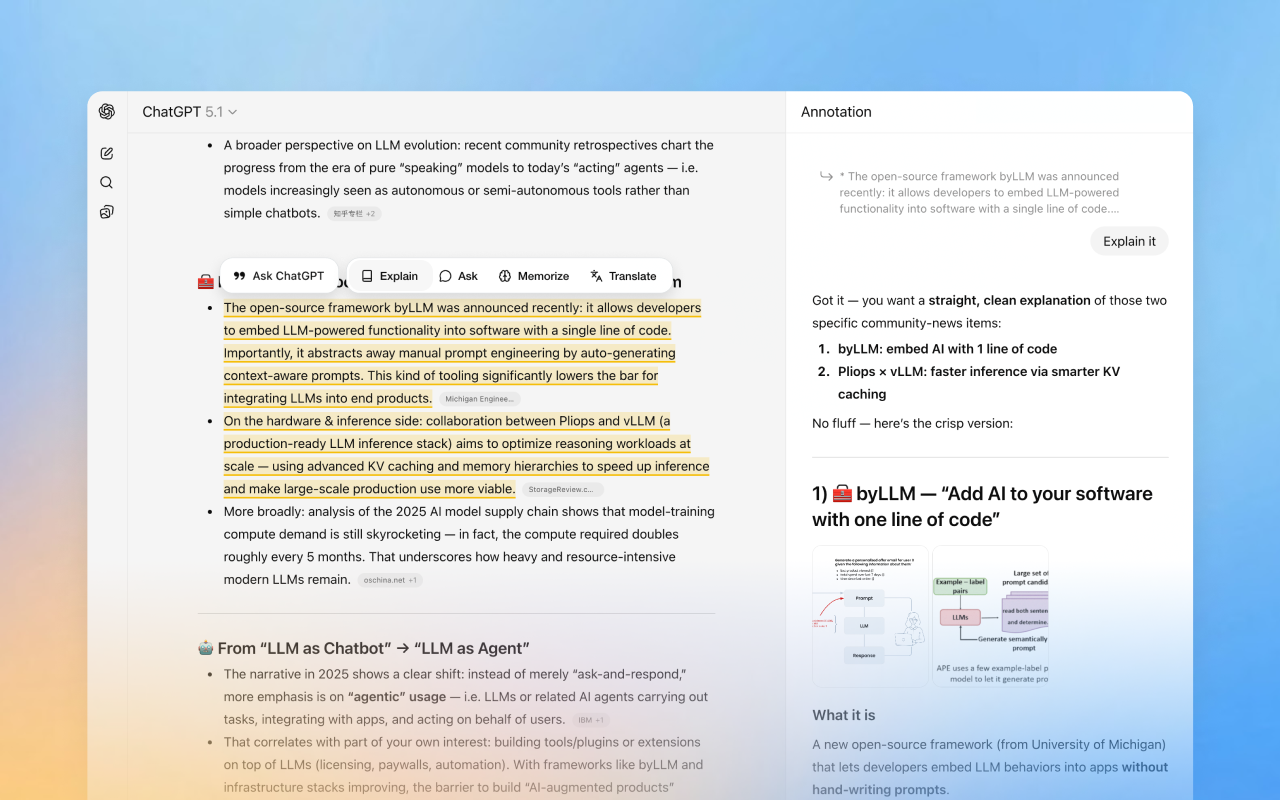
HighlightGPT is a lightweight browser extension that upgrades how you use ChatGPT. When you’re reading long replies, code explanations or API docs, simply highlight any part of the text and ask a follow-up question with one click. Answers open in a clean side panel, so you keep the main chat visible while deep-diving into specific lines. Perfect for debugging, learning unfamiliar code and staying in flow.
chatgptchrome extensiondeveloper toolsai productivitydebuggingcode explanationside panelworkflow automation
What to expect from an ideal product
- Highlight any line in a ChatGPT response and ask a follow-up question without losing your place in the main conversation
- Answers appear in a side panel so you can compare the original reply and the new explanation side by side
- Built for developers who need to debug code snippets or look up unfamiliar functions mid-conversation without opening a fresh chat
- No copy-pasting, no tab switching, no context lost: one click from selected text to a specific answer
- Works directly inside ChatGPT as a browser extension, so there is nothing new to learn and no separate tool to manage
More topics related to HighlightGPT
Similar topics
- How to ask follow-up questions about specific parts of ChatGPT responses without losing context
- How to debug code explanations from ChatGPT line by line without interrupting your workflow
- How to quickly clarify confusing sections in ChatGPT's API documentation while keeping the original conversation visible

