This task can be performed using HighlightGPT
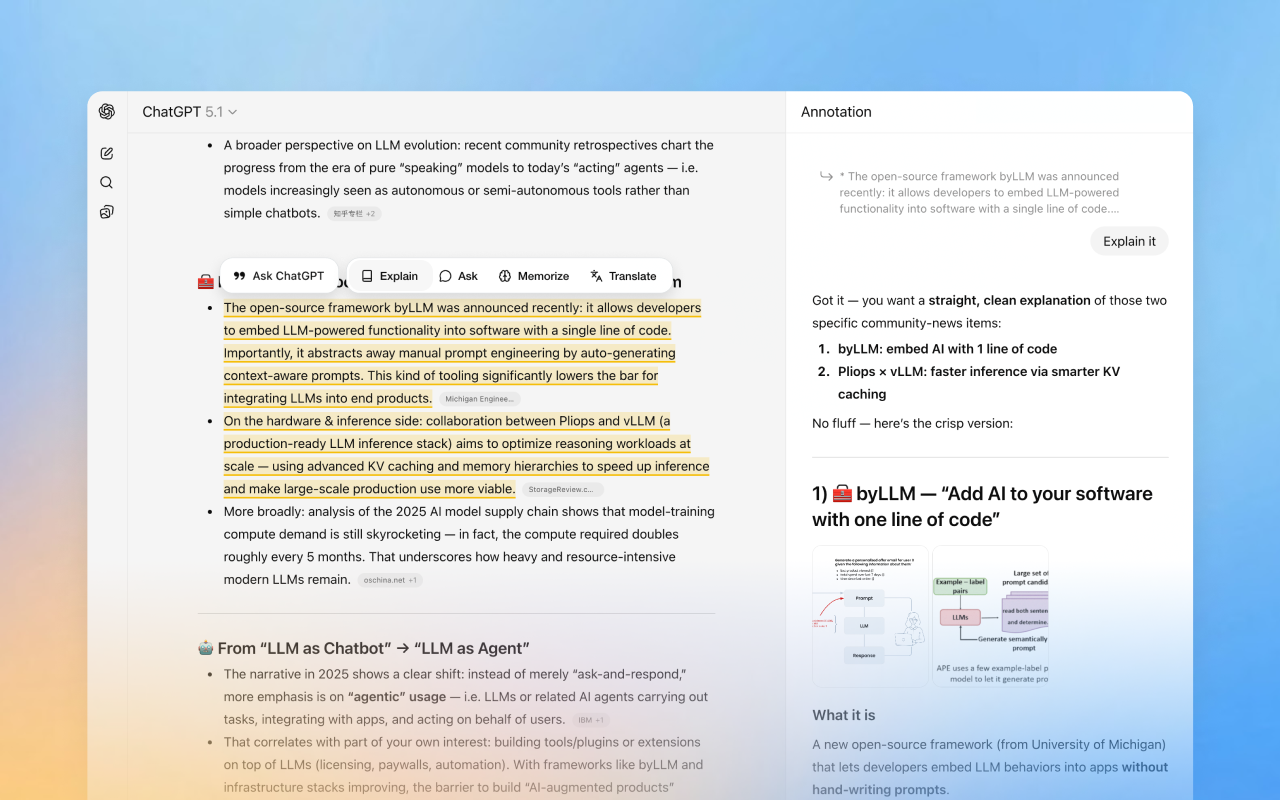
Highlight text in ChatGPT and get instant answers
Best product for this task

HighlightGPT is a lightweight browser extension that upgrades how you use ChatGPT. When you’re reading long replies, code explanations or API docs, simply highlight any part of the text and ask a follow-up question with one click. Answers open in a clean side panel, so you keep the main chat visible while deep-diving into specific lines. Perfect for debugging, learning unfamiliar code and staying in flow.
chatgptchrome extensiondeveloper toolsai productivitydebuggingcode explanationside panelworkflow automation
What to expect from an ideal product
- Highlight specific lines of code in ChatGPT's response and ask targeted questions without starting a new conversation thread
- Get explanations for confusing functions or syntax errors in a side panel while keeping the original code explanation visible on screen
- Ask follow-up questions about error messages or debugging steps without losing context from the main ChatGPT conversation
- Break down complex code blocks into smaller parts by highlighting sections and getting focused answers for each piece
- Stay focused on your debugging session by avoiding the back-and-forth scrolling between your question and ChatGPT's long responses

