Talat Reviews — Discover what people think of this product.

What users think of talat

Supporters
-Idea
4.0
Product
0.0
Feedback
0
Roasted
0
More about talat
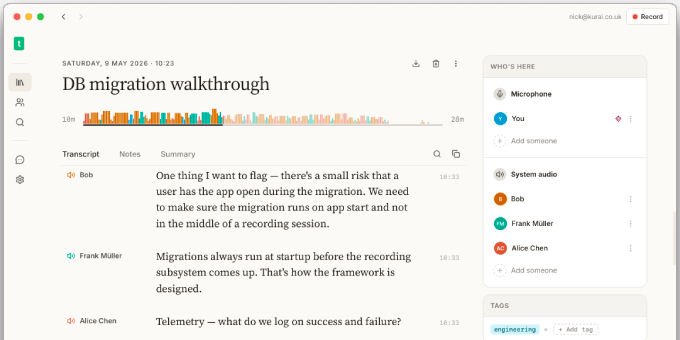
talat is a private, on-device meeting notes app for macOS and Windows. It captures both your microphone and the system audio from whichever conferencing app you're using, transcribes both sides of the conversation in real time, and turns each meeting into a searchable, editable transcript with an automatic summary at the end. Everything happens locally: your audio never crosses the network, your transcripts live in a database on your own disk, and there's no account to sign up for. The end result is the same kind of meeting-note workflow you'd get from a cloud-based tool, but without the cloud.
Privacy isn't a setting in talat, it's the architecture. The app ships without analytics, telemetry, or any usage tracking whatsoever, so nothing about how you use it ever leaves your machine. Transcription runs entirely on-device, using hardware acceleration where available (the Apple Neural Engine on M-series Macs, ONNX Runtime with DirectML on Windows), and summaries are generated by a local LLM by default. If you'd rather use a cloud LLM for summarisation (which tends to give better results on longer meetings), that's your call; you choose the provider, you supply the API key, and the relationship is between you and them.
In day-to-day use, talat tries to disappear. Once it's running in the background it watches for conferencing apps grabbing your microphone, and quietly starts recording when one does; Zoom, Microsoft Teams, Slack, Discord, FaceTime, and calls held in your browser are all detected, so Google Meet and other web-based services are picked up too. A brief notification tells you a recording has begun (the app should never feel like it's doing things behind your back), and from there it gets out of the way. You can also connect Apple or Google Calendar so scheduled meetings auto-promote into recordings when their time window opens, or drive everything manually with a global hotkey, the tray icon, or a drag-and-dropped audio file for offline transcription of something you recorded elsewhere.
Once a meeting exists, the natural next question is what to do with it. Every transcript is fully editable (click any line, press Enter to split, Backspace to merge with the previous one), every speaker can be named once and recognised in every future meeting, and every meeting can be exported as Markdown, PDF, or pushed via webhook to any HTTP endpoint you configure. Pointing the auto-export folder at an Obsidian vault is a popular setup; an MCP server lets Claude Code, Claude Desktop, and any other stdio MCP client search your transcripts and pull meeting context directly. A global command palette (⌘K / Ctrl+K) sits over the whole library with BM25 full-text search across titles, notes, and every utterance you've ever recorded.
Almost every behaviour is configurable; empowerment matters as much as privacy. Bring your own LLM (Ollama, OpenAI, Anthropic, Claude CLI, or any OpenAI-compatible endpoint), rewrite the summarisation prompt, pick an audio retention window from 7 days to forever, choose your transcription model (English-only or multilingual), tune the speaker-matching sensitivity, set a custom filename template, and so on.
Tags
Product Categories
Related Tasks
- How to take meeting notes without missing important conversation details?
- How to transcribe meetings in real time without using cloud services?
- How to keep meeting notes private by running AI transcription fully on-device?
- How to export meeting transcripts and summaries to different formats and AI assistants?
Featured Today


tiun
Payments backend for indie hackers
All-in-one: Auth, payments & DB
Single command: MCP, Skills
Built for developers.
Merchant of Record. Better fees.
Join the Microlaunch builder community
Get product updates, weekly standouts, and founder deals.