This task can be performed using RouteCord
A visual mixer to transfer and record Discord voice with your own bots
Best product for this task

RouteCord
productivity
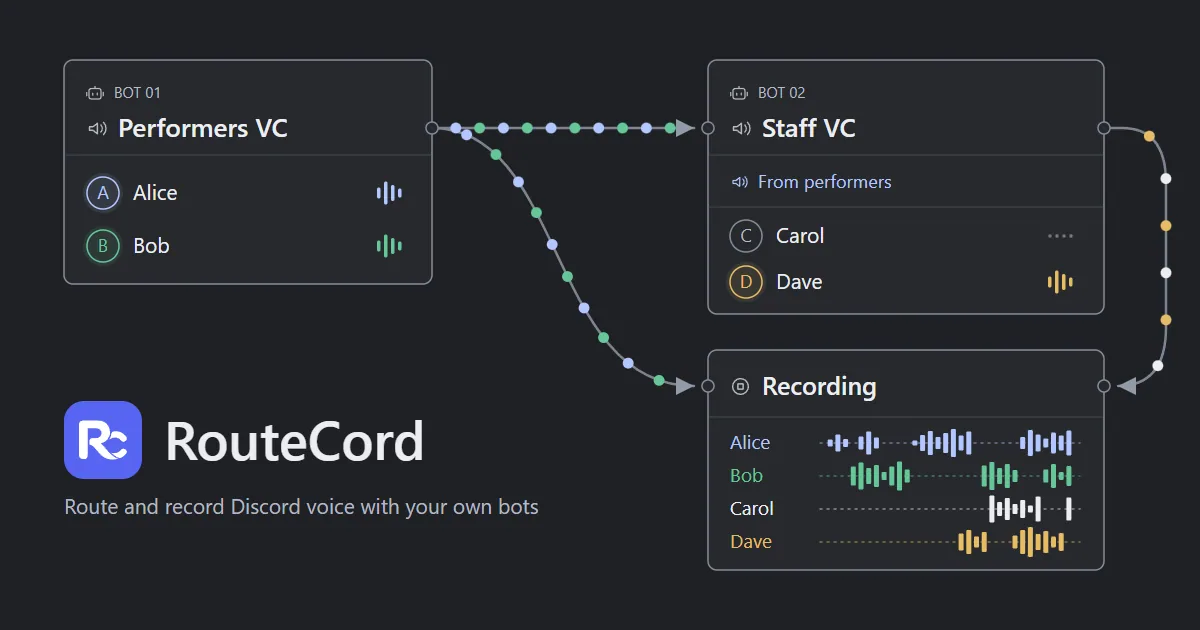
RouteCord routes audio between Discord voice channels and records each participant to separate tracks in your browser, using your own bots while keeping all audio processing and storage on your device.
discord routermultitrack recordervoice relaydiscord audiostreaming utilitiescontent creationvoice productioncommunity management
What to expect from an ideal product
- RouteCord records every Discord participant to a separate audio track directly in your browser, so you never mix voices together or lose individual stems.
- No third-party servers touch your audio. All processing and storage happen on your own device, which matters if you record interviews, podcasts, or sensitive calls.
- You bring your own Discord bots, so you stay in control of permissions, uptime, and how many channels you monitor at once.
- The visual mixer lets you route audio between Discord voice channels in real time, giving you a live board to manage who records where without touching Discord's developer console mid-session.
- Because everything runs locally, there are no subscription storage limits, no upload queues, and no waiting for a cloud render when the session ends.

