This task can be performed using RouteCord
A visual mixer to transfer and record Discord voice with your own bots
Best product for this task
RouteCord
productivity
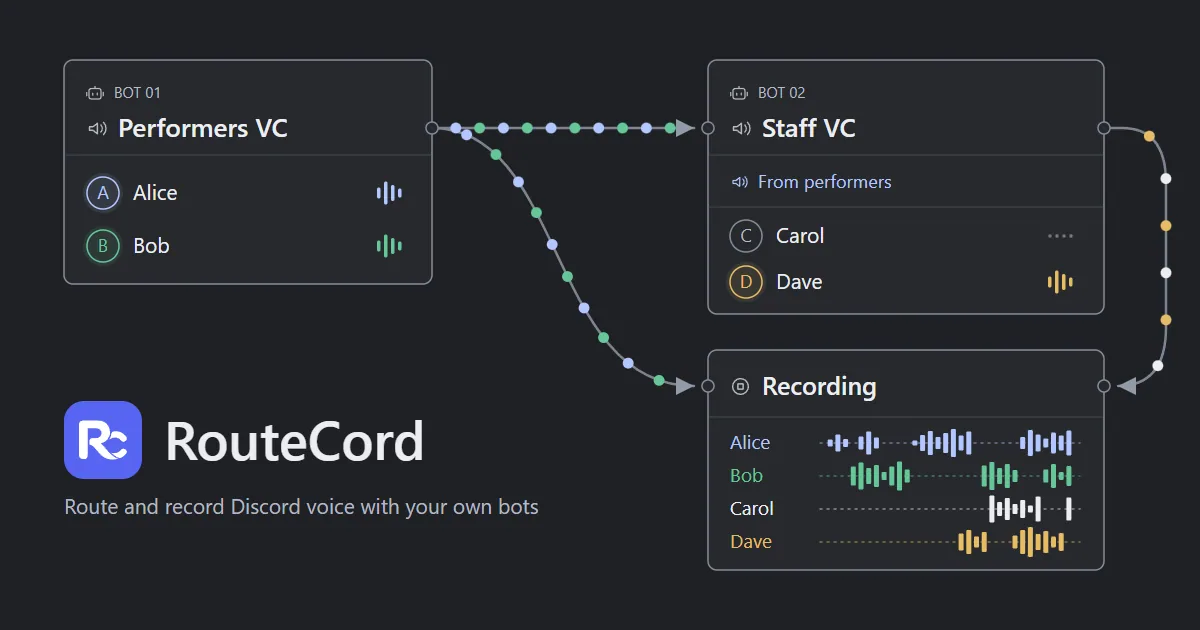
RouteCord routes audio between Discord voice channels and records each participant to separate tracks in your browser, using your own bots while keeping all audio processing and storage on your device.
discord routermultitrack recordervoice relaydiscord audiostreaming utilitiescontent creationvoice productioncommunity management
What to expect from an ideal product
- RouteCord runs entirely in your browser, so no audio ever touches a third-party server and no software installation is required.
- Each Discord speaker gets their own isolated audio track, making post-production editing, noise removal, and mixing straightforward without bleed between voices.
- You bring your own Discord bots, which means you control the connection, the permissions, and the data from start to finish.
- RouteCord includes a visual mixer so you can monitor, route, and balance voice channels in real time before and during the recording session.
- Podcasters, game masters, and interview hosts use it to capture clean per-participant audio directly from Discord without relying on Craig, Audacity workarounds, or paid recording platforms.

