This task can be performed using Statable
Cookieless web analytics hosted in the EU
Track multiple sites together
List every domain, estimate their combined monthly pageviews, and choose a cookieless analytics plan that pools usage across sites. Confirm that one account can cover unlimited websites, then decide how each site should be named.
Add the tracker to each site's shared layout, publish it once, then visit a known page and verify that traffic appears under the correct site. Repeat domain by domain, and compare the pooled total with your plan's pageview allowance.
Best product for this task

Statable
analytics
Statable is cookieless web analytics for people who want clear numbers without the compliance overhead. No cookies means no consent banner, so you count every visitor instead of only those who click Accept. The tracker is about 2.1 KB, with a 471-byte build. Data is processed in the EU by a Dutch company. Plans start at $9/month for 10,000 pageviews, pooled across unlimited websites rather than charged per site.
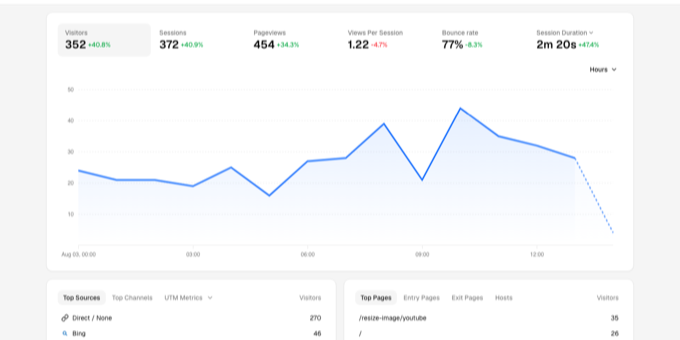
What to expect from an ideal product
- Statable pools pageviews across unlimited websites on a single plan, so running 10 or 20 sites does not multiply your monthly bill.
- No cookies means no consent banner on any of your sites, which removes the risk of undercounting visitors who skip or ignore the prompt.
- The tracker weighs about 2.1 KB, so adding it across multiple domains adds almost no load time overhead.
- All data from every site you connect is processed in the EU under Dutch jurisdiction, which simplifies compliance for site owners targeting European audiences.
- At $9/month for 10,000 pooled pageviews, low-traffic sites cost nothing extra to add, making Statable practical for agencies or builders managing several small properties.
More about rollout checks
Treat each domain as a separate verification step. Clean web analytics reports depend on assigning the right tracker to the right site and avoiding duplicate installation.
- Test production pages, not only staging or preview URLs.
- Check templates, tag managers, and plugins so the tracker loads only once.
- Review pooled usage after launch, especially when one busy site could consume most of the allowance.

