This task can be performed using NovaWire
NovaWire — Fast, native HTTP/HTTPS debugging proxy for Windows. From capture to OpenAPI contract in one window.
Best product for this task

NovaWire
dev-tools
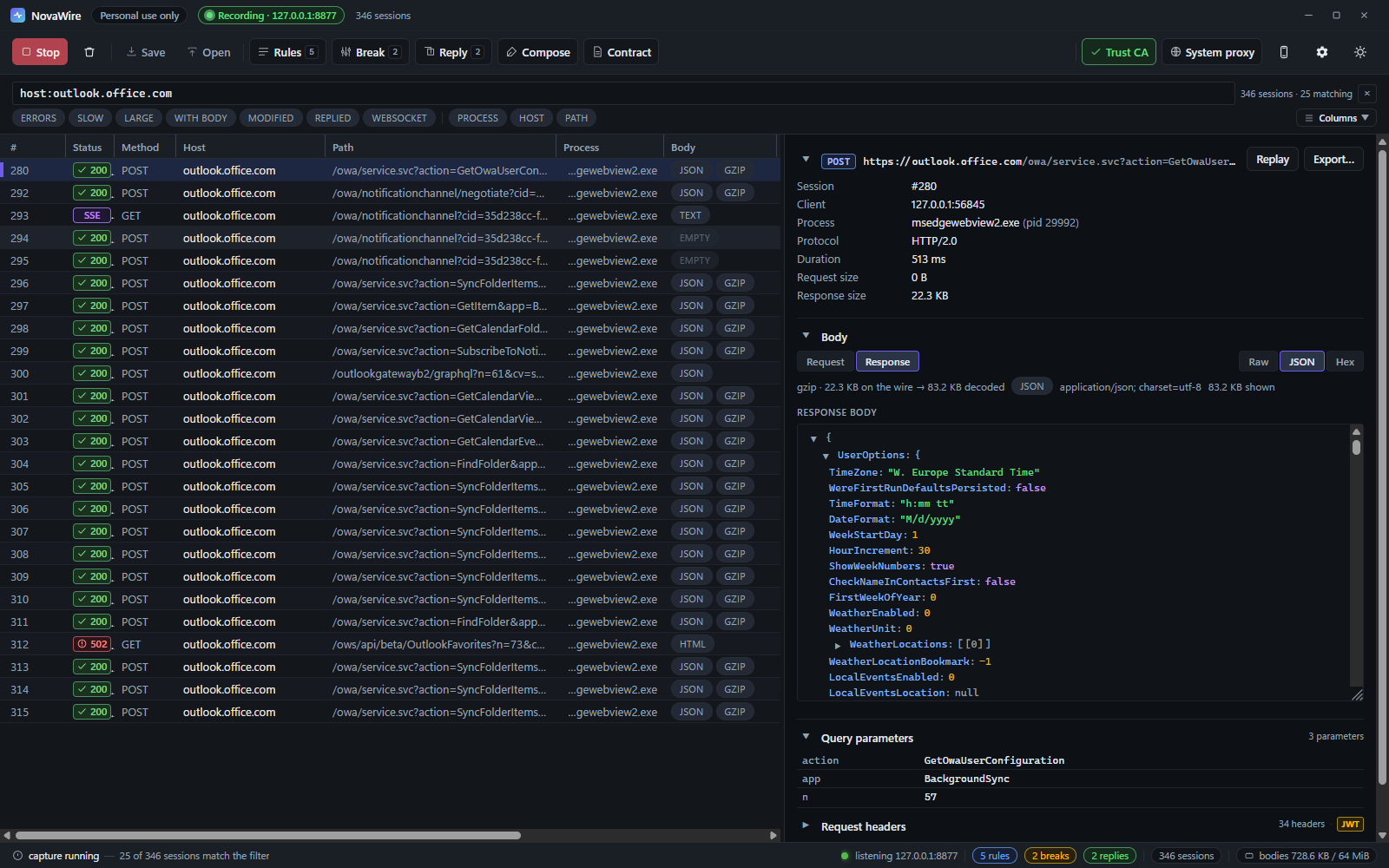
NovaWire is a native HTTP/HTTPS debugging proxy for Windows that captures real network traffic, lets you inspect and rewrite requests and responses, replay calls, and generate OpenAPI specs directly from live exchanges.
mitm proxyhttp sniffertraffic interceptordebugging proxynetwork inspectionapi testinghttp analysisdeveloper utilities
What to expect from an ideal product
- NovaWire runs as a local Windows proxy, routing HTTPS traffic through itself so you see every request and response in plain text, no browser extension required.
- You can intercept traffic from any Windows app, not just browsers, making it useful for debugging desktop software, API clients, and background services.
- Built-in rewrite rules let you modify headers, swap response bodies, or redirect endpoints on the fly without touching your application code.
- NovaWire converts captured traffic into a valid OpenAPI spec automatically, so you document your API as a side effect of debugging it.
- Replay any captured request with one click, which cuts the feedback loop when you are testing backend changes or reproducing a reported bug.

