This task can be performed using LandingBoost
Find what stops your landing page from converting
Best product for this task

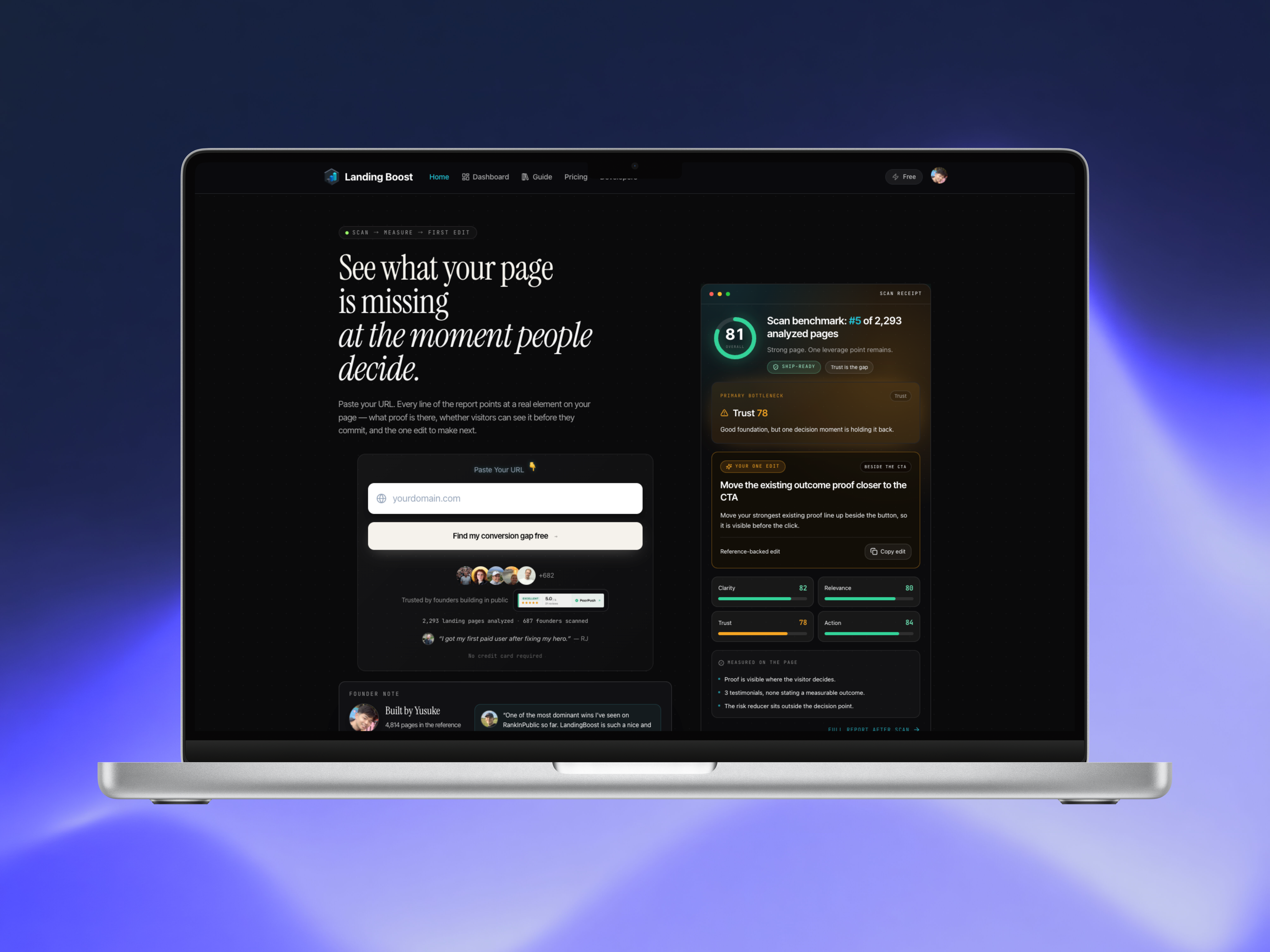
LandingBoost scans any SaaS landing page, compares clarity, relevance, trust, and action signals with revenue-backed references, and identifies the single highest-leverage edit to make first. Founders get page-grounded evidence, a prioritized fix, and a paste-ready prompt so they can improve the page, rescan it, and measure whether the conversion signal moved. It is built for SaaS founders, indie hackers, agencies, and small growth teams.
What to expect from an ideal product
If you're searching for a LandingBoost review, you likely want a fast answer to one question: does this tool actually tell you what's wrong with your landing page, or is it another generic checklist generator? This guide walks through what LandingBoost is, how it works, what it costs, and how it stacks up against tools like Unbounce and Hotjar — so you can decide if it fits your workflow before you run your first scan.
What Is LandingBoost?
LandingBoost is an AI-powered landing page audit tool built for SaaS founders, indie hackers, agencies, and small growth teams. Instead of producing a long, generic list of "best practices," it scans a live landing page and evaluates it across four conversion axes:
- Clarity — Is the value proposition immediately understandable?
- Relevance — Does the page match visitor intent and expectations?
- Trust — Are trust signals present and credible?
- Action — Is the call to action clear, visible, and compelling?
The core idea behind LandingBoost is prioritization. Rather than handing you 30 suggestions to sort through, it identifies the single highest-leverage edit to make first, backed by page-grounded evidence and revenue-backed reference patterns.
This makes it useful as a landing page conversion audit tool, particularly for teams that don't have a dedicated CRO specialist on staff and need a clear next step rather than a wall of recommendations.
How Does LandingBoost Work?
Understanding how LandingBoost works helps set expectations before you run a scan. The process is designed to be simple enough for a solo founder but structured enough to be useful for an agency auditing client pages.
Step 1: Submit Your Landing Page URL
You provide the live URL of the SaaS landing page you want audited. LandingBoost scans the page as it currently exists — no code changes, tracking snippets, or integrations required to get started.
Step 2: The Scan Evaluates Four Conversion Axes
The tool analyzes the page against Clarity, Relevance, Trust, and Action signals, comparing patterns against revenue-backed references. This is different from a generic accessibility or performance audit — it's specifically focused on conversion psychology and messaging structure.
Step 3: You Receive a Prioritized Diagnosis
Instead of a checklist, the report surfaces the single bottleneck most likely holding back conversions. This is paired with:
- Page-grounded evidence (specific elements on your page, not generic advice)
- A score breakdown across the four axes
- The exact located page element causing the issue
- An implementation-ready prompt you can paste into your editor or AI writing tool
Step 4: Apply the Fix and Rescan
Once you make the recommended change, you can rescan the page and compare whether the conversion signal improved. This closes the loop — you're not guessing whether an edit helped, you're measuring it against the same framework.
Prerequisites Before You Start
Before running a LandingBoost scan, make sure you have:
- A live, published landing page URL. The tool audits pages as they currently render, so staging environments behind login walls won't work.
- Analytics access (optional but recommended). While not required for the scan itself, having your own conversion data helps you validate whether the recommended edit correlates with real traffic behavior after you rescan.
- Editing access to the page. You'll want to be able to implement the suggested edit quickly — whether that's a headline change, a repositioned CTA, or an added trust element.
- Clear goal definition. Know what "conversion" means for your page — signup, demo request, trial start — since this frames how you interpret the Action axis results.
Step-by-Step: Running Your First LandingBoost Free Scan
Here's a practical walkthrough for using the LandingBoost free scan to get your initial diagnosis.
Step 1: Go to LandingBoost Visit LandingBoost and locate the scan input field.
Step 2: Paste your landing page URL Use the exact live URL of the page you want evaluated — typically your homepage or a specific campaign landing page.
Step 3: Run the scan The free scan provides your initial diagnosis, giving you a sense of where the page stands across the four conversion axes.
Step 4: Review the diagnosis Look at which axis scored lowest and read the summary explanation. This is your first signal of where the biggest opportunity lies.
Step 5: Unlock full edit guidance (optional) Paid access unlocks the complete edit guidance, including the paste-ready prompt, located page element, and full score breakdown — useful once you're ready to act rather than just diagnose.
Step 6: Implement the recommended edit Apply the single highest-leverage change identified in the report. Resist the urge to make five changes at once — the point of prioritization is testing one variable at a time.
Step 7: Rescan and compare Run another scan after your edit goes live. Compare the new score against your baseline to see whether the conversion signal moved in the right direction.
Example Use Case: A Solo SaaS Founder
Imagine a founder with a landing page that gets steady traffic but low trial signups. Instead of guessing whether the problem is the headline, pricing table, or lack of testimonials, they run a scan. The report flags Trust as the lowest-scoring axis, points to a specific section of the page lacking credibility signals, and provides a prompt to rewrite that section. The founder implements the change, rescans, and checks whether the Trust score — and ideally, real signup behavior — improved.
This example is illustrative of the intended workflow, not a documented case study. [Source needed] for any specific outcome data.
LandingBoost Pricing
LandingBoost pricing follows a freemium model:
- Free scan: Provides the initial diagnosis — your score breakdown across Clarity, Relevance, Trust, and Action, plus a high-level indication of the top issue.
- Paid access: Unlocks complete edit guidance, including the page-grounded evidence, the specific located element, and the implementation-ready prompt needed to act on the recommendation.
Specific pricing tiers, currency amounts, and billing frequency are not detailed here. Check LandingBoost directly for current pricing, as this is the kind of detail that changes as the product evolves.
LandingBoost for Agencies
For agencies managing multiple client landing pages, LandingBoost for agencies use cases typically center on:
- Running quick audits before a client kickoff to identify low-hanging fruit
- Using the prioritized, single-edit format to communicate recommendations clearly to non-technical stakeholders
- Rescanning after implementation to demonstrate measurable improvement in conversion signal scores
Because the tool focuses on one highest-leverage fix rather than an overwhelming list, it can be easier to justify a single recommended change to a client than to explain a 20-item audit.
LandingBoost vs. Unbounce
A common comparison search is LandingBoost vs Unbounce, but these tools solve different problems.
- Unbounce is primarily a landing page builder and A/B testing platform — you use it to build, publish, and test page variants.
- LandingBoost is a diagnostic and audit tool — it doesn't build pages, it evaluates existing ones and tells you what to fix first.
In practice, they can be complementary: build and test variants in Unbounce, then run a LandingBoost scan on the live version to identify the next highest-leverage edit before your next test cycle.
LandingBoost vs. Hotjar
Another frequent comparison is LandingBoost vs Hotjar.
- Hotjar focuses on behavioral data — heatmaps, session recordings, and surveys that show how visitors interact with your page.
- LandingBoost focuses on structured evaluation against conversion axes and provides a specific, prioritized recommendation rather than raw behavioral data you need to interpret yourself.
Hotjar tells you where users click, scroll, and drop off. LandingBoost tells you which conversion element is likely underperforming and what to do about it. Teams using both may find Hotjar useful for confirming why an issue exists once LandingBoost has flagged what to fix.
LandingBoost Alternatives and Tools Like LandingBoost
If you're evaluating LandingBoost alternatives or searching for tools like LandingBoost, it helps to categorize what you're actually looking for:
- Page builders with built-in testing (e.g., Unbounce) — best if you need to construct and iterate on pages, not just audit an existing one.
- Behavioral analytics tools (e.g., Hotjar) — best if you want raw visitor behavior data rather than a prioritized recommendation.
- Manual CRO audits or consultants — best if you want a human expert's judgment, though typically slower and costlier than an automated scan.
LandingBoost's differentiator is the combination of a structured four-axis framework, page-grounded evidence, and a single prioritized edit — rather than requiring you to interpret raw data or sort through a generic checklist yourself.
Common Mistakes to Avoid
- Scanning a staging or password-protected URL. The tool needs a live, publicly accessible page.
- Implementing multiple changes before rescanning. This makes it impossible to isolate which edit actually moved the signal.
- Ignoring the lowest-scoring axis in favor of a personal preference. The prioritized recomm

