This task can be performed using LandingBoost
Find what stops your landing page from converting
Best product for this task

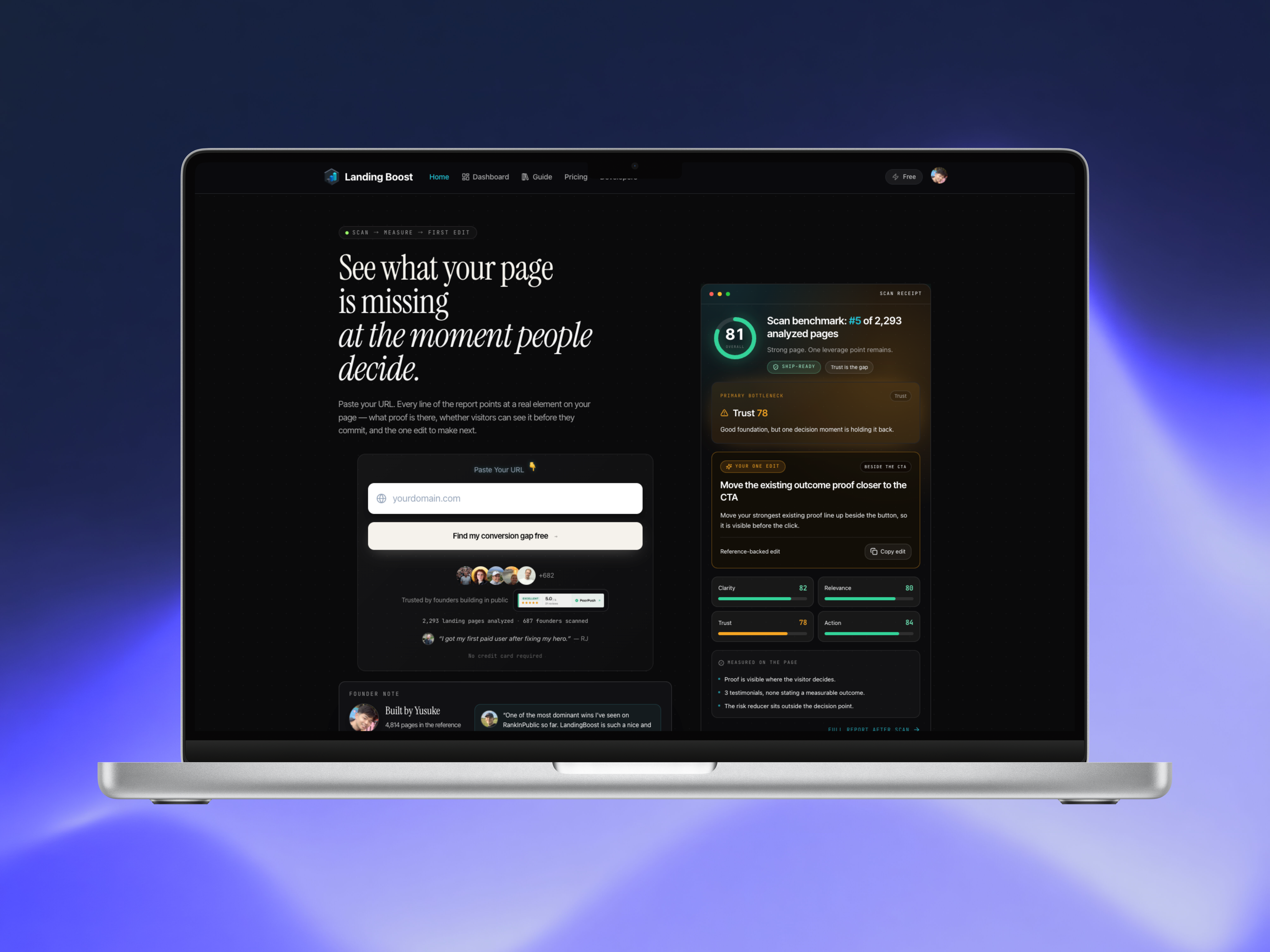
LandingBoost scans any SaaS landing page, compares clarity, relevance, trust, and action signals with revenue-backed references, and identifies the single highest-leverage edit to make first. Founders get page-grounded evidence, a prioritized fix, and a paste-ready prompt so they can improve the page, rescan it, and measure whether the conversion signal moved. It is built for SaaS founders, indie hackers, agencies, and small growth teams.
What to expect from an ideal product
If you're asking "why isn't my landing page converting," you're not alone, and the answer is rarely one big broken thing. It's usually one specific bottleneck hiding among dozens of small decisions: unclear copy, a mismatched headline, missing trust signals, or a call-to-action that doesn't ask for the right next step. This guide walks you through a practical, repeatable landing page audit process so you can find that bottleneck, fix it, and measure whether it worked.
Why Landing Pages Stop Converting
Most landing pages don't fail because of one catastrophic error. They fail because visitors quietly lose confidence or interest at a specific point in the page — and founders rarely know where that point is without a structured audit.
A landing page audit typically evaluates four things:
- Clarity — Can a visitor understand what you do and who it's for in seconds?
- Relevance — Does the page match the visitor's intent and the traffic source that brought them there?
- Trust — Are there credible signals that reduce perceived risk?
- Action — Is there one clear, low-friction next step?
When one of these axes breaks down, conversion rate drops — even if the design looks polished. This is why a landing page scanner tool that separates these signals is more useful than a generic checklist.
Prerequisites Before You Start
Before running any audit — manual or automated — gather a few things:
- A live, published URL. Audits work best on the actual page visitors see, not a design mockup.
- Your traffic source context. Are visitors coming from paid ads, organic search, a cold email, or a product directory? Relevance depends on this.
- Your current conversion number, even a rough one (signups, demo requests, trial starts). You need a baseline to know if a fix worked.
- 15–30 minutes of uninterrupted time. Rushing an audit leads to surface-level fixes that don't move the needle.
Once you have these, you're ready to start diagnosing.
Step-by-Step: How to Audit Your Landing Page
Step 1: Read Your Page Like a Stranger
Open your landing page in an incognito window. Give yourself five seconds, then look away. Ask:
- What does this company do?
- Who is it for?
- What do I do next?
If you can't answer all three instantly, neither can your visitors. This is the fastest way to catch a landing page clarity score problem before running any tool.
Step 2: Check Message-to-Traffic Match
Pull up the ad, search query, or referral link that would send someone to this page. Does the headline echo that language? A visitor who clicked "AI landing page audit" expects to land somewhere that says exactly that — not a vague "grow your business" headline. This mismatch is one of the most common reasons a landing page not converting problem exists, and it's invisible unless you check relevance deliberately.
Step 3: Audit Trust Signals
Scan for:
- Specific outcomes or use cases (not just adjectives like "powerful" or "easy")
- Logos, testimonials, or third-party mentions
- Pricing transparency or a clear "how it works" explanation
- Security, privacy, or credibility cues if you're asking for a card or email
A landing page trust score checker approach means asking: if I were skeptical, what would make me hesitate here — and is that addressed?
Step 4: Evaluate the Action Path
Look at every call-to-action on the page. Is there one dominant, obvious next step, or are visitors given five competing buttons? Multiple asks — "Book a demo," "Start free trial," "Read docs," "Join waitlist" — dilute action signals and slow decisions down.
Step 5: Score Each Axis Honestly
Rate Clarity, Relevance, Trust, and Action on a simple scale (1–5). Don't average them into one number yet — the goal is to see which axis is weakest, not to get a vanity score.
Step 6: Identify the Single Highest-Leverage Fix
This is where most manual audits go wrong. Founders often try to fix everything at once — rewrite the headline, add testimonials, redesign the button, and change the layout — in the same week. That makes it impossible to know what actually moved conversion.
Instead, find the one thing to fix on your landing page that maps to your weakest axis, and change only that.
Step 7: Implement, Rescan, Compare
After making the edit:
- Rescan the page (manually or with a tool).
- Compare the new signal against the previous one.
- Give it enough traffic or time to be meaningful before drawing conclusions.
This loop — audit, fix, rescan, measure — is the core of how to improve landing page conversion rate sustainably, rather than guessing.
How to Know if Landing Page Copy Is Clear
A quick manual test: hand your headline and subheadline to someone unfamiliar with your product and ask them to explain it back in one sentence. If they can't, your clarity score is low regardless of how the page looks visually. Clear copy answers three questions in order: what is it, who is it for, and why should they care right now.
Where AI-Powered Audits Fit In
Manual audits are useful, but they're subjective and time-consuming, especially if you're testing multiple pages or don't have a growth team to lean on. This is where an AI landing page audit tool can help — not by replacing judgment, but by making the diagnosis faster and evidence-based.
LandingBoost is built around this exact problem: finding what stops a landing page from converting. Instead of returning a long generic checklist, it scans a live SaaS landing page and compares clarity, relevance, trust, and action signals against revenue-backed references. Rather than telling you fifteen things you could theoretically fix, it identifies the single highest-leverage edit to make first — the change most likely to move your conversion signal.
Each report includes:
- Page-grounded evidence (not generic advice)
- A score breakdown across the four axes
- A specific, located page element to change
- A paste-ready prompt you can use to implement the fix
This matters because prioritized landing page fixes are more useful than exhaustive ones. A founder with limited time doesn't need a 40-item list — they need to know what to fix first on their landing page and why.
After making the change, you can rescan the page and compare the before-and-after signal, which is essentially a lightweight landing page A/B test before/after workflow without needing a full experimentation platform.
Common Mistakes in Landing Page Audits
- Fixing multiple things at once. You lose the ability to attribute improvement to a specific change.
- Auditing design instead of message. A beautiful page with a confusing value proposition still won't convert.
- Ignoring traffic source context. A page can be "clear" in isolation but irrelevant to the visitor who actually arrives.
- Treating trust as an afterthought. Adding a logo bar at the last minute isn't the same as building credibility into the page's structure.
- Never rescanning after a fix. Without measuring conversion improvement, you're guessing whether the change helped.
- Relying only on opinion. Internal teams often disagree on what's "confusing" — evidence-based scoring reduces this friction.
Free vs. Paid Landing Page Audit Tools
Free landing page audit options are useful for an initial diagnosis — they can flag obvious issues and give you a directional score. Paid tools typically go further, unlocking complete edit guidance, deeper report details, and implementation support like a ready-to-use prompt.
If you're comparing landing page audit tools, consider:
- Does it give a specific fix, or a generic list?
- Is the evidence grounded in your actual page, or templated advice?
- Can you rescan after making a change to measure impact?
- Does it fit your workflow as a founder, indie hacker, or small growth team without requiring a full CRO agency engagement?
LandingBoost's model reflects this: a free scan provides the initial diagnosis, while paid access unlocks the complete prioritized fix and implementation prompt — useful whether you're an indie hacker shipping solo or an agency running audits for clients.
A Simple Audit Checklist You Can Reuse
- [ ] Read the page cold — can you explain it in one sentence?
- [ ] Match headline language to your actual traffic source
- [ ] List every trust signal currently on the page
- [ ] Count how many competing calls-to-action exist
- [ ] Score Clarity, Relevance, Trust, and Action separately
- [ ] Pick one fix tied to the weakest score
- [ ] Implement only that fix
- [ ] Rescan and compare the signal
FAQ
Why isn't my landing page converting even though it looks good? Visual polish doesn't fix unclear messaging, weak trust signals, or a diluted call-to-action. A structured audit across clarity, relevance, trust, and action usually reveals the real bottleneck.
What is the single most important landing page fix I should make first? It depends on your weakest axis. If visitors don't understand what you do, fix clarity first. If they understand but don't trust you, fix trust signals. Fixing everything at once makes it impossible to know what worked.
How much does a landing page audit cost? Costs vary. Manual audits cost your time; agency audits can be expensive [Source needed]; tools like LandingBoost offer a free initial scan with paid access for complete guidance.
How do I measure if my landing page edit actually improved conversion? Establish a baseline before changing anything, make one change at a time, then rescan or monitor conversion data over a meaningful period

