This task can be performed using Screen Charm
Create screen recordings with zoom effects in minutes
Best product for this task

Screen Charm
tech
Screen Charm is a macOS screen recording app for polished demos, tutorials, and training videos. It offers smart auto-zoom, cursor tracking with customizable styles, and webcam overlays with custom or preset backgrounds. A built-in editor lets you trim, adjust zooms, and tweak exports without extra tools. Recording is free, and a one-time payment unlocks unlimited 4K UHD exports.
What to expect from an ideal product
- Screen Charm lets you trim your screen recording and remove unwanted sections directly inside the app, no external video editor needed.
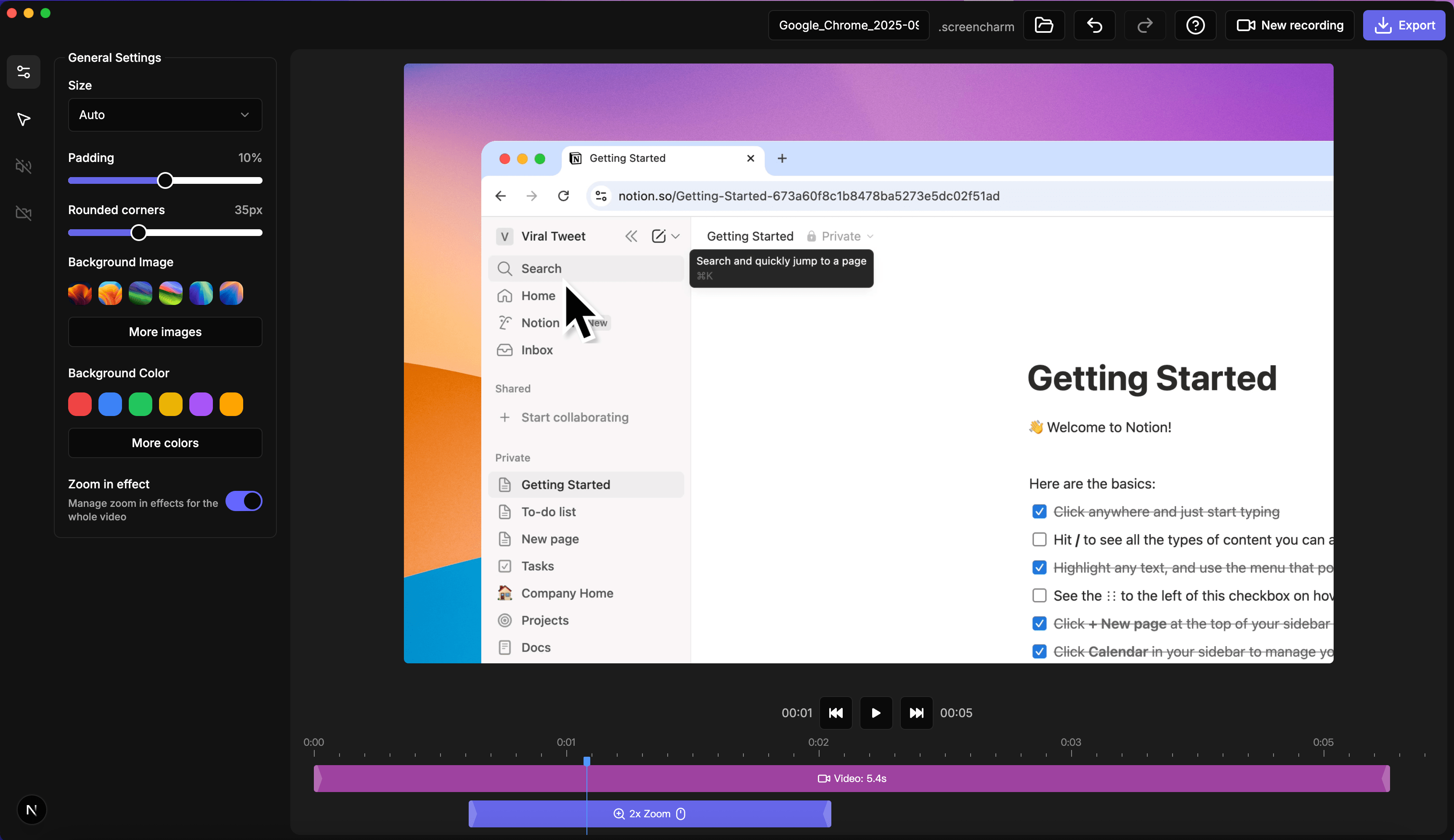
- You can adjust zoom effects after recording, so a poorly timed zoom does not mean you have to start over.
- The built-in editor shows your zoom keyframes on a timeline, making it easy to shift, shorten, or delete individual zoom moments.
- Trimming and zoom editing work together in one workflow, which cuts the time between recording and a finished, shareable video.
- Once your edits are done, you export in up to 4K UHD with a one-time payment, no subscription required.

