This task can be performed using Statable
Cookieless web analytics hosted in the EU
Best product for this task

Statable
analytics
Statable is cookieless web analytics for people who want clear numbers without the compliance overhead. No cookies means no consent banner, so you count every visitor instead of only those who click Accept. The tracker is about 2.1 KB, with a 471-byte build. Data is processed in the EU by a Dutch company. Plans start at $9/month for 10,000 pageviews, pooled across unlimited websites rather than charged per site.
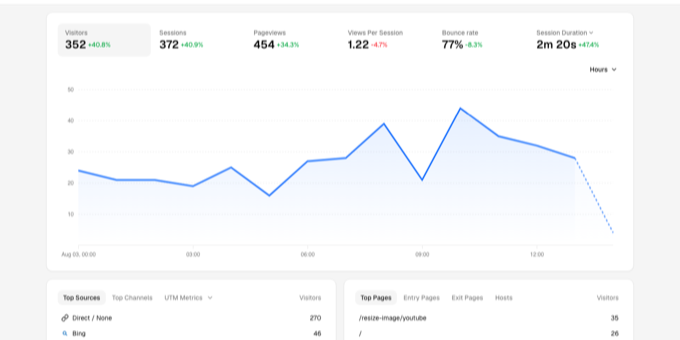
If you run a small startup, choose analytics by matching the tool to your decisions, privacy requirements, and budget. This guide shows how to compare cookieless options, test one on a real website, and verify that the resulting numbers are useful.
1. Define the decision before comparing tools
Start with a short measurement list. For example, an indie SaaS founder might need to know:
- How many people visit the pricing page?
- Which sources bring qualified traffic?
- How many visitors start a trial?
- Do visitors reach the signup form?
Avoid choosing based on a long feature checklist. For web analytics for indie hackers and web analytics for SaaS founders, a tool is useful when it answers the next product or marketing question clearly.
Write down these prerequisites:
- Your main website and any related projects
- The events or goals you need to measure
- Your preferred data region
- Your approximate monthly pageviews
- Whether you need funnels, public dashboards, or an API
If you are replacing a larger platform, first review this guide to [replace Google Analytics with privacy-friendly tools](/h/ how-to-replace-google-analytics-with-privacy-friendly-tools).
2. Compare privacy, coverage, and effort
Next, score each candidate against four practical checks:
- Visitor coverage: Does it use cookies or persistent identifiers? A cookieless tracker can count visitors without relying on consent-banner acceptance, but review exactly what data it stores.
- Data location: Check where processing and storage occur. This matters when evaluating privacy-friendly analytics for startups and EU requirements.
- Implementation cost: A small tracker can reduce page weight and setup friction. Statable’s tracker is about 2.1 KB, with a 471-byte build.
- Pricing model: Calculate the cost across every site you operate. A per-site limit can become expensive for a founder with a marketing site, documentation site, and side project.
For example, suppose your startup runs three websites with 3,000 pageviews each per month. A plan pooling 10,000 pageviews across unlimited websites may fit better than three separate site allowances. Statable starts at $9 per month for 10,000 pageviews, pooled across unlimited websites.
For a broader comparison, place candidates beside other web analytics products, but keep the scorecard tied to your actual decisions.
3. Test the tool on one real journey
Choose one journey, such as:
- A visitor arrives from a launch post.
- They view the pricing page.
- They click “Start trial.”
- They reach the confirmation page.
Install the candidate and configure only the pageviews, source reporting, and one or two custom events needed for this journey. Then check whether the dashboard makes each row usable as a filter. This is more revealing than reading a feature list.
Statable includes pageviews, visitors, sources, countries, devices, custom events, goals, funnels, and scroll depth. Its data is processed in the EU by a Dutch company, with no cookies, persistent identifiers, or IP storage. Those details may suit teams seeking cookieless analytics without adding a consent banner.
Record the setup time and answer:
- Can you find the journey without training?
- Can you separate the launch source from direct traffic?
- Can you inspect the event by page, device, or country?
- Does the dashboard provide enough context for a decision?
4. Verify the result before committing
Do not judge the tool by whether its totals match another platform exactly. Different collection methods can produce different counts. Instead, verify that events arrive consistently and that the numbers support your stated decision.
Use this checklist:
- Visit the site from a test source.
- Trigger the selected goal or event.
- Confirm the event appears in the dashboard.
- Apply filters and check that the result changes logically.
- Compare the report with actual trial or sales records.
- Review the result again after several days.

